Native mobile apps, built for speed, and a local instance you can host at home are on their way.

Documents
Prose
Documents that look like paper and save like the cloud.
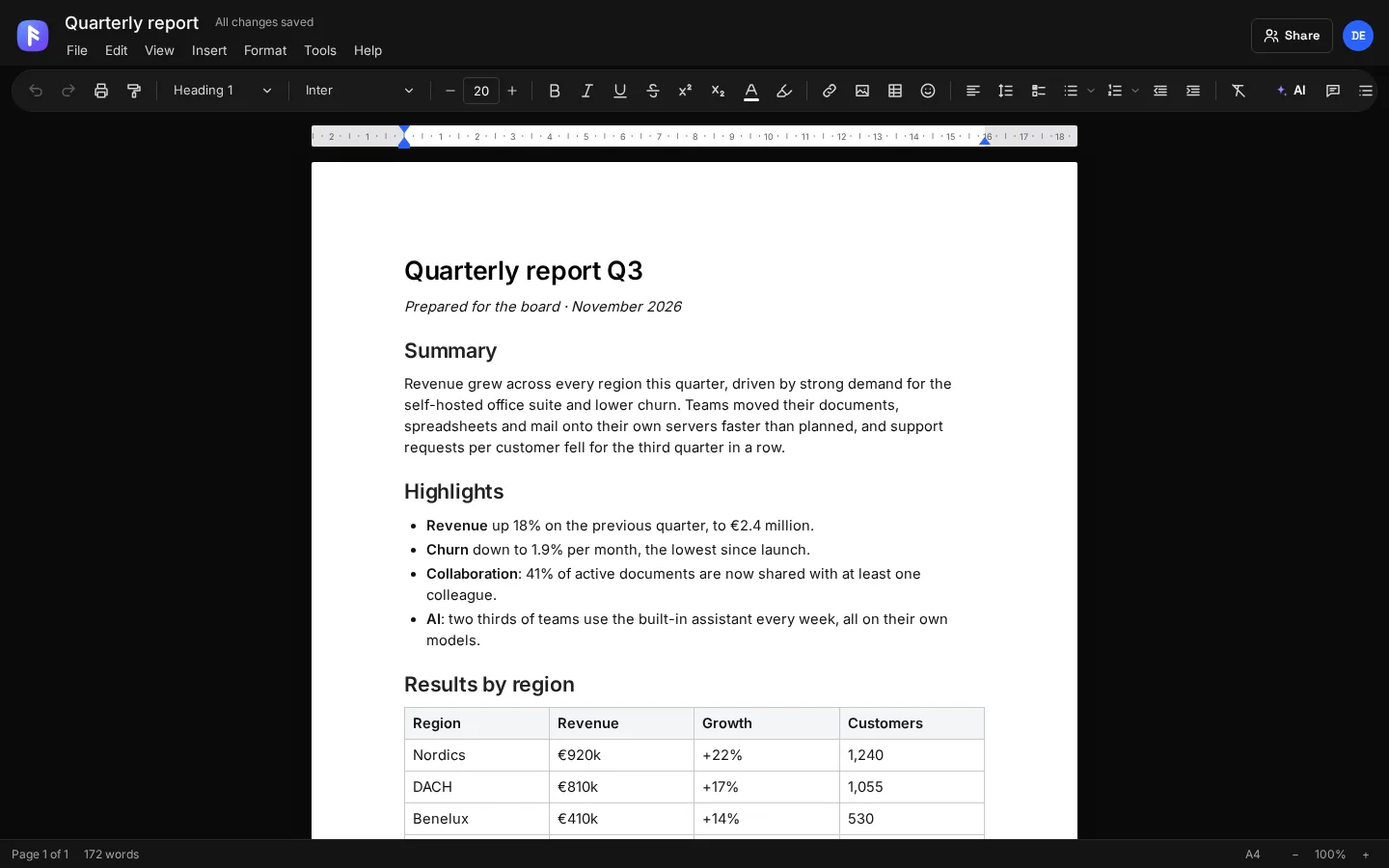
Prose is a full word processor in your browser. Lay out real pages with margins, headers and page numbers, format every paragraph, and open or save Word files. Every keystroke saves to your own storage.
Runs in any modern browser and installs as an app. Native apps are on the way: Rust on the desktop for Linux, Windows and macOS, and native mobile apps for iOS and Android.
Features
What Prose does
Write with AI
Improve, shorten, fix grammar, change tone, continue writing or put a summary on top, right on your selection (Ctrl+J).
Write together
Share a document with anyone who has an account here. See who is in it, and their changes arrive while you work.
Real page layout
A4, Letter, Legal and custom sizes, portrait or landscape, margins you drag on the ruler, and page breaks you can see.
Headers and footers
Left, center and right slots with page numbers, page count, title and date. Hide them on the first page or start numbering anywhere.
Full text formatting
Fonts, sizes, colors, highlight, sub- and superscript, line spacing, indents, spacing before and after, and a format painter.
Tables, images and columns
Tables with cell colors and alignment, images with text wrap and alt text, and two- or three-column layouts.
Word in, Word out
Open .docx files and export to .docx with headers, footers, page fields and tab stops intact. Also Markdown, HTML and PDF.
Version history
Prose keeps earlier versions as you work. Preview any of them and restore it in one click.
Templates
Start from a letter, report, resume, meeting notes or a blank page.
Watermarks and page color
Mark drafts as DRAFT or CONFIDENTIAL and set the paper color for the whole document.
Two ways to use it
In the browser today. On desktop and mobile soon.
Both work with the same account and the same files, so you can switch between them at any time.
Web app
Open Prose in Firefox, Chrome, Safari or Edge. Use “Install app” in your browser to give it its own window and icon.
Open ProseDesktop app Coming soon
A native app built in Rust: it starts instantly, uses little memory and connects straight to this server.
Mobile app Coming soon
Native apps for iOS and Android, optimized for speed and battery, with your files available offline.
At a glance
Details
- Category
- Word processor
- Opens
- .docx, .md, .html, .txt
- Saves as
- Your storage, plus .docx, .md, .html and PDF export
- Works offline
- Installs as an app from the browser
- Account
- Your bqfff account. Sign in with a passkey or an email code
- Where your data lives
- On this server, in your private storage. No third-party cloud
Also on bqfff.page
Works with the other apps
 Spreadsheets
Tally
Spreadsheets with the formulas you already know.
Learn more Notes
Jot
Notes that stay plain Markdown files.
Learn more Files
Vault
Every file you own, on hardware you own.
Learn more Git
Trunk
Your own Git server, with a client built in.
Learn more Mail
Post
Every mail account in one inbox, and nobody tracking you.
Learn more AI chat
Bro
Your own AI, with your files, the web and a computer to run code.
Learn more